SAP
On SAP BTP a login rarely fails because of the protocol and often because of a role. The SAP tab checks tokens and configuration and, for a 403, tells you which scope is missing and where it is assigned.
- Tab
- SAP
- Sections
- Check, Why 403?, Flows, Learn
- Flows
- five for SAP BTP
- Storage
- memory only
Check
Paste an XSUAA or IAS token, an xs-security.json, an xs-app.json, a service key, a destination (JSON or properties) or a logon ticket (MYSAPSSO2). AuthTailor checks it for the usual mistakes.
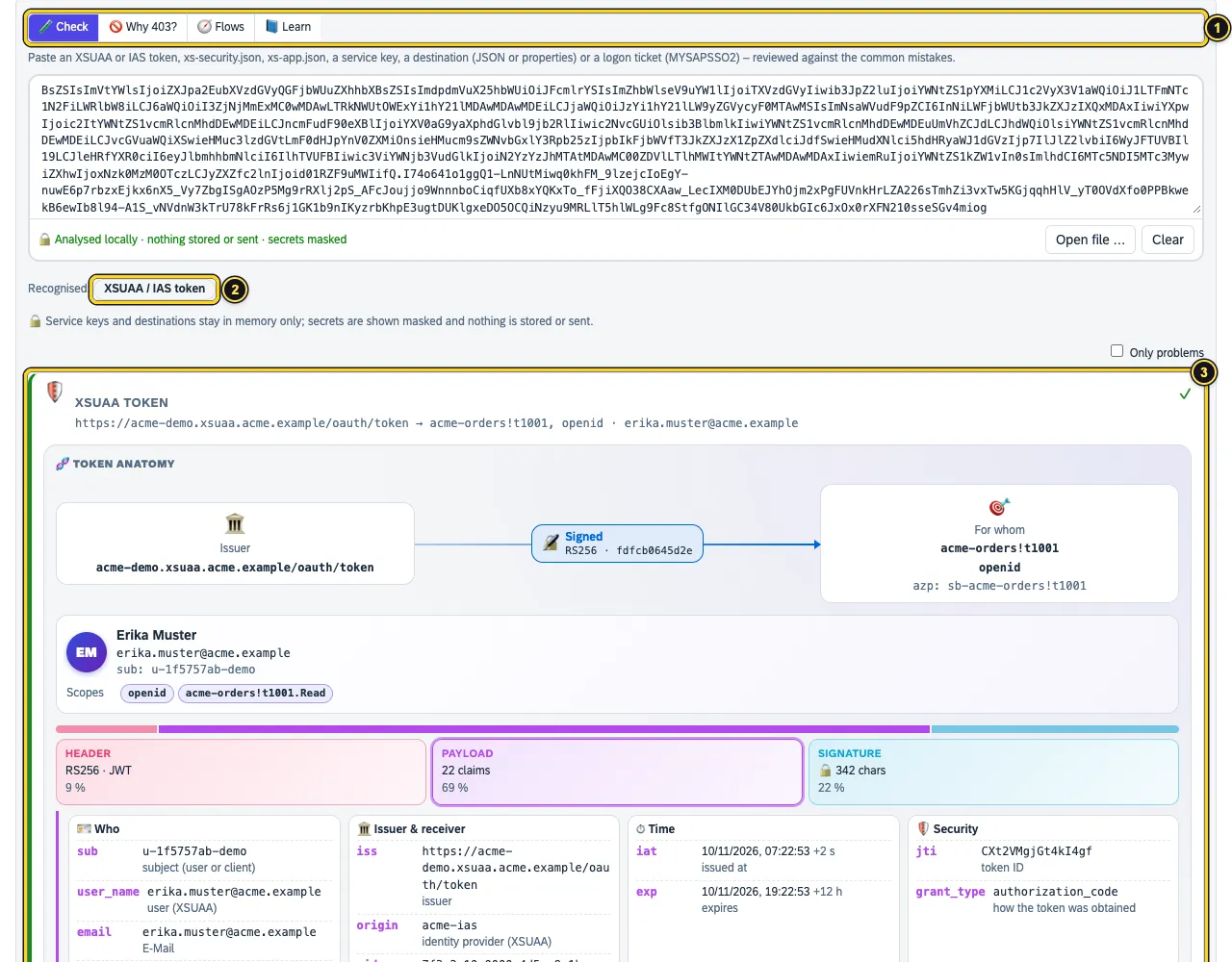
- The four sections: Check, Why 403?, Flows, Learn.
- Recognised: here XSUAA / IAS token. Also possible: xs-security.json, xs-app.json, Service key, Destination and Logon ticket (MYSAPSSO2).
- The card with the same token anatomy as in Tokens and SAML, plus SAP claims such as
origin,zidandxs.rolecollections.
Service keys and destinations stay in memory only. AuthTailor shows secrets masked; nothing is stored or sent.
xs-security.json
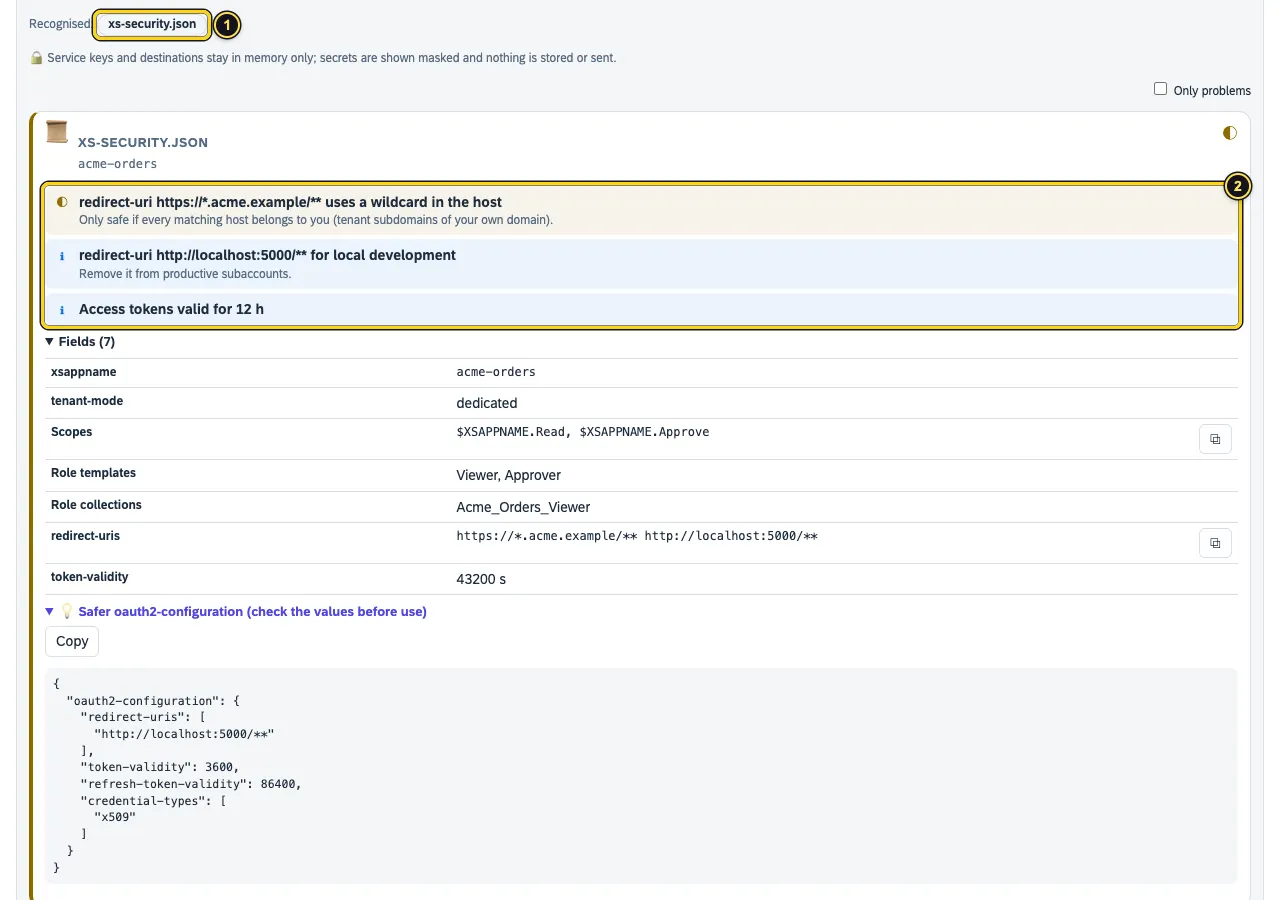
- Recognised: xs-security.json.
- The findings – here a wildcard in the host of the
redirect-uris, alocalhostentry for development and long token lifetimes.
Below are the fields – scopes, role templates, role collections, redirect-uris, token-validity – and a suggestion for a safer oauth2-configuration to copy. Check the values before using them.
To try it out there are the examples XSUAA token, xs-security.json, xs-app.json and Destination.
Why 403?
A 403 from the app router or a CAP service usually means: the scope is not in the token. Paste the token and what the app expects – you see exactly what is missing and where to assign it.
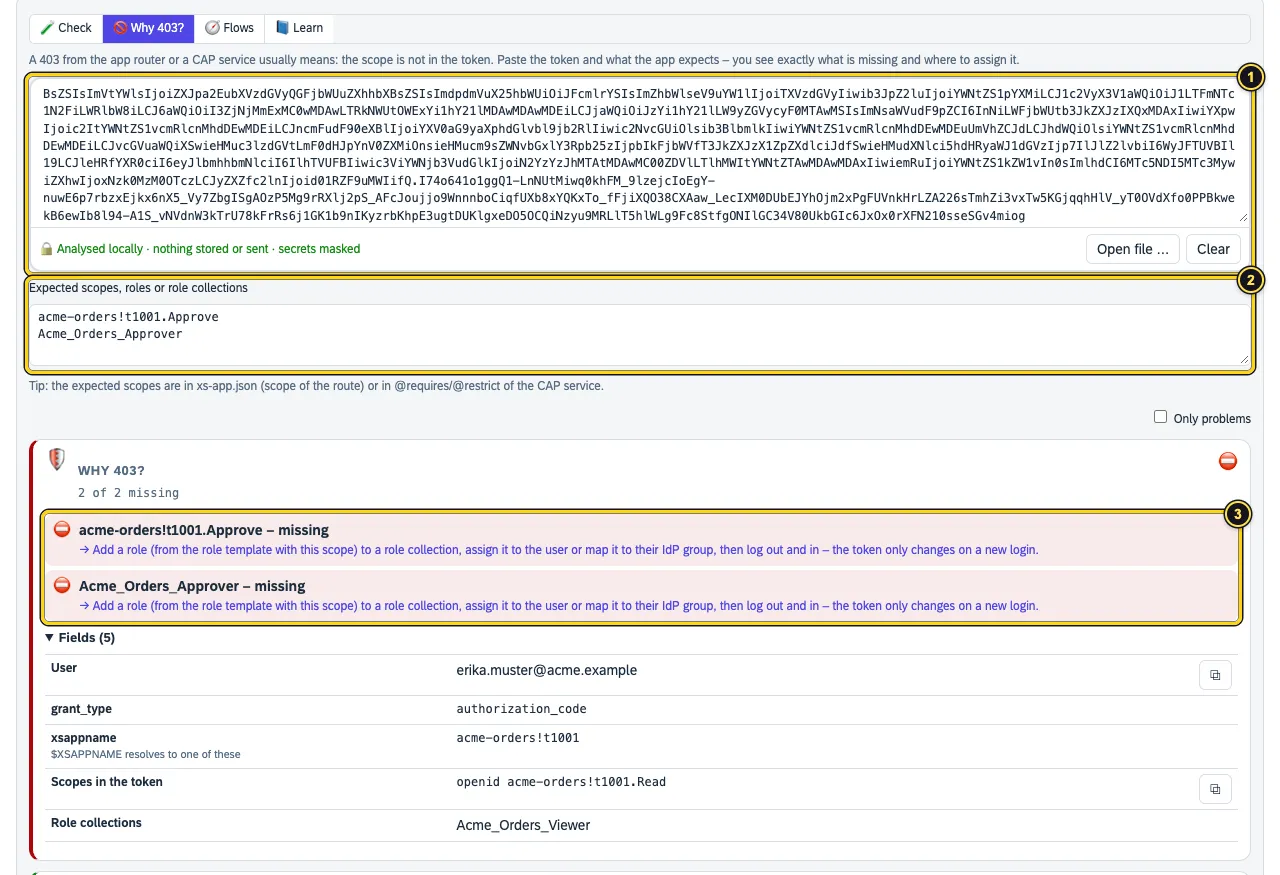
- The token.
- Expected scopes, roles or role collections – separated by comma, space or line. AuthTailor understands
$XSAPPNAME. - What is missing, each with a fix: add the role to a role collection, assign it to the user or their IdP group, then log out and in again.
Why do I see no JWT with Integration Suite?
Integration Suite, Build Work Zone and many other apps on SAP BTP log you in via an SAP App Router. The App Router is a confidential client: it redeems the code at XSUAA on the server and gives the browser only a session cookie. The JWT stays on the server. No browser and no extension ever sees it – not even a HAR from the DevTools, and Also bearer tokens does not help because the app makes its calls with the cookie.
Instead of a token, AuthTailor shows the note SAP App Router: the token stays on the server under Across the flow in the recording or the pasted HAR – with what the recording reveals anyway:
| Detail | Where it comes from |
|---|---|
| Subaccount | subdomain in the XSUAA host: <subaccount>.authentication.<region>.hana.ondemand.com (or …cloud.sap) |
| Region | from the same host, for example eu10 |
| XSUAA client | the login’s client_id: the app’s sb-<xsappname> |
| Trust (origin) | origin key of the trust configuration from …/login/callback/<origin> – later appears as origin in the token |
| IdP | login page of SAP Cloud Identity Services or SAP ID Service, if XSUAA forwards there |
| App Router | host of the App Router from the redirect_uri |
Missing state and PKCE are SAP standard with the App Router: it keeps target and return in its own signed cookies and redeems the code with a client secret or certificate. AuthTailor therefore shows this only as a note, not as a serious weakness – likewise missing PKCE when XSUAA asks the IdP. Other apps keep the warning.
Where to look next:
- The user’s role collections: in the BTP cockpit under subaccount → Security → Users.
- For a 403 on an API call: get a token from a service key (client credentials), paste it and check it against the expected scopes with Why 403?.
- Understand the flow: BTP login: App Router → XSUAA → IAS → corporate IdP under Flows.
Finding errors between IAS, corporate IdP and BTP
Behind the App Router, XSUAA hands the login on to IAS, and IAS often to the corporate IdP. How much of this the recording shows depends on the protocol of each leg:
- SAML: the assertion travels through the browser. Open the step with the
SAMLResponse– attributes, NameID, signature and validity are there. - OIDC: only the code travels through the browser; the receiving side redeems it on the server. AuthTailor names these legs under Across the flow in the note OIDC between the IdPs: these tokens stay on the server too, for example
XSUAA → <tenant>.accounts.ondemand.comorIAS → <corporate IdP>.
For the OIDC legs, the errors are in the IdPs’ logs:
- IAS ↔ corporate IdP and IAS ↔ BTP: IAS admin console → Monitoring & Reporting → Troubleshooting Logs, filtered by user and time.
- Corporate IdP: its sign-in logs, for Microsoft Entra ID the sign-in logs with the AADSTS code.
- BTP: mapped groups and role collections in the BTP cockpit under Security → Users.
If AuthTailor reports Logged on via SAP ID Service, not your own IAS, the login used the default trust sap.default at accounts.sap.com. Your own IAS and the corporate IdP were not involved at all. Look up the origin key of the IAS trust under Security → Trust Configuration, log on again and choose that IdP on the login page. The user must exist with this origin. If only your own IdP should appear, switch off “Available for User Logon” for the default identity provider; in the App Router a route can force it with "identityProvider": "<origin key>".
Flows
Five flows on SAP BTP as sequence diagrams: who talks to whom, what travels along and where it goes wrong.
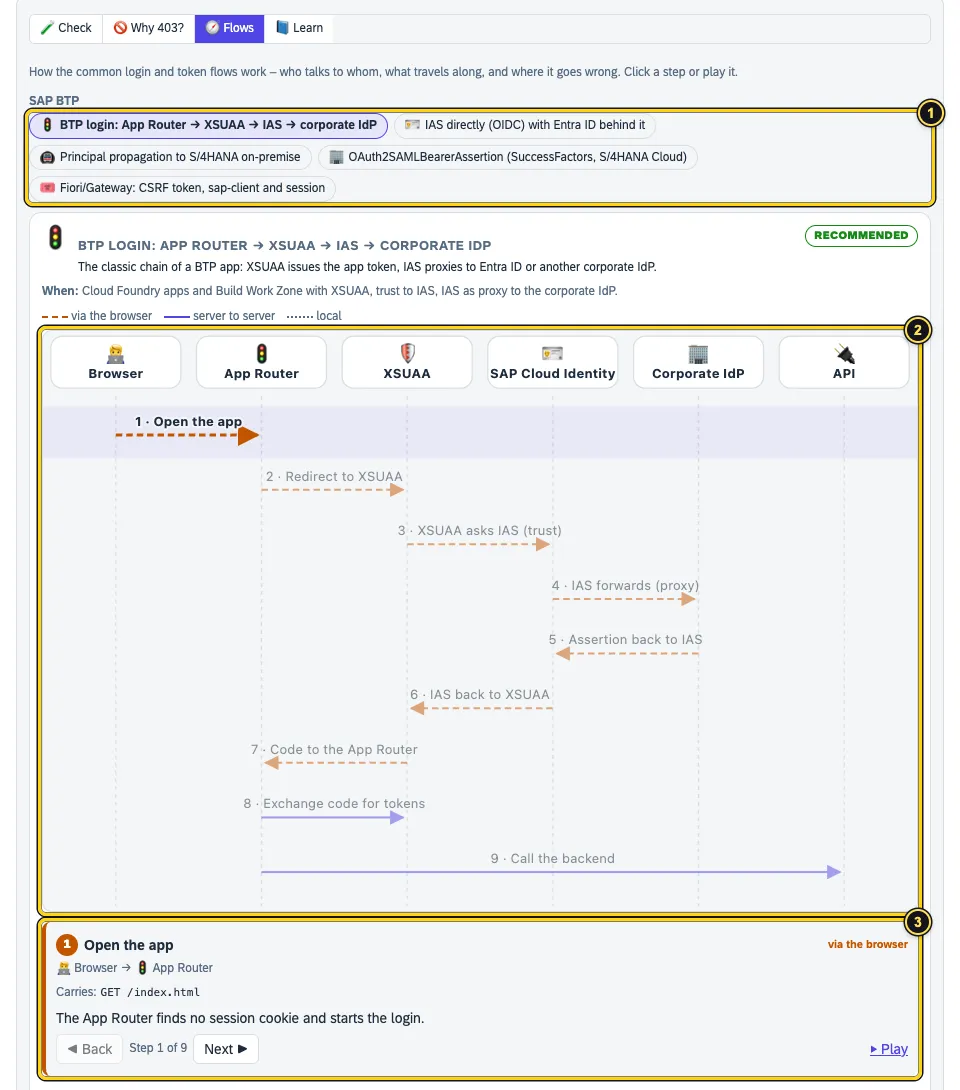
- The choice: BTP login: App Router → XSUAA → IAS → corporate IdP, IAS directly (OIDC) with Entra ID behind it, Principal propagation to S/4HANA on-premise, OAuth2SAMLBearerAssertion (SuccessFactors, S/4HANA Cloud) and Fiori/Gateway: CSRF token, sap-client and session.
- The diagram: dashed via the browser, solid from server to server, dotted local.
- The detail of the selected step with what travels along. Back, Next and Play walk through the flow.
The general flows for SAML, OAuth and OIDC are in Learning.
Learn
How login and authorisations work on SAP BTP – in six chapters, plus a glossary and the SAP errors.
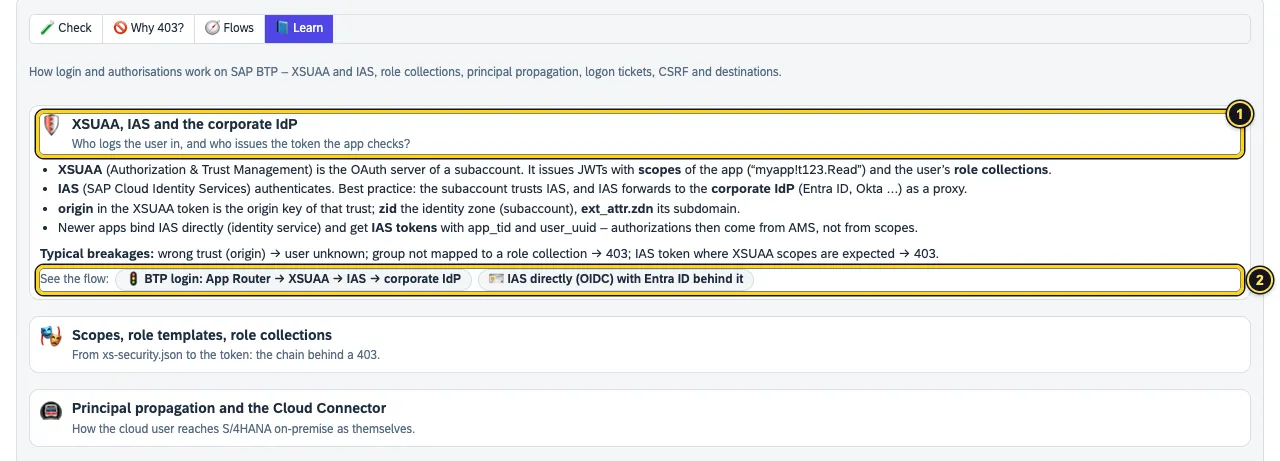
- A chapter: briefly explained, with the typical breaks.
- See the flow opens the matching flow in Flows.
The chapters: XSUAA, IAS and the corporate IdP · Scopes, role templates, role collections · Principal propagation and the Cloud Connector · Logon tickets (MYSAPSSO2) and assertion tickets · Fiori and Gateway: CSRF token, sap-client, sap-usercontext · Destinations without surprises. Under SAP errors you search the known errors of XSUAA, SAP Cloud Identity Services and SuccessFactors with cause and fix.
See also
- Features at a glance Features · SAP
- Docs Tokens and SAML
- Docs Learning
- Docs Tools
- Sources SAP artefacts1 · Why 403?2