Reading the result
Recorded or pasted – the result always has the same structure: the verdict with the next step at the top, then the traffic light, the flow step by step and one card per message.
- Verdict
- four levels
- Rating
- five areas
- Flow
- browser, app, identity provider
- Report
- Markdown, masked
The verdict
At the very top is what AuthTailor thinks of the login – in one sentence, with the next step. The pictures show a recording of the made-up app “Acme Orders”: the login works, but the API rejects an approval.

- The verdict in four levels: All clear, Worth a look, Login breaks here or Nothing recognised. Below it the cause in one sentence.
- Next step: what you should do now.
- The counters: critical and high findings, medium findings and passed checks.
- Flows in this input: which flow was recognised, here Authorization Code + PKCE. A click opens the explanation in Learning.
- Load keys from … fetches the issuer’s public keys so that AuthTailor can check the signature of the JWTs. More in Tokens and SAML.
The security rating
Even a login that works can be insecure. The Security rating sorts all findings into five areas and gives each a traffic light.
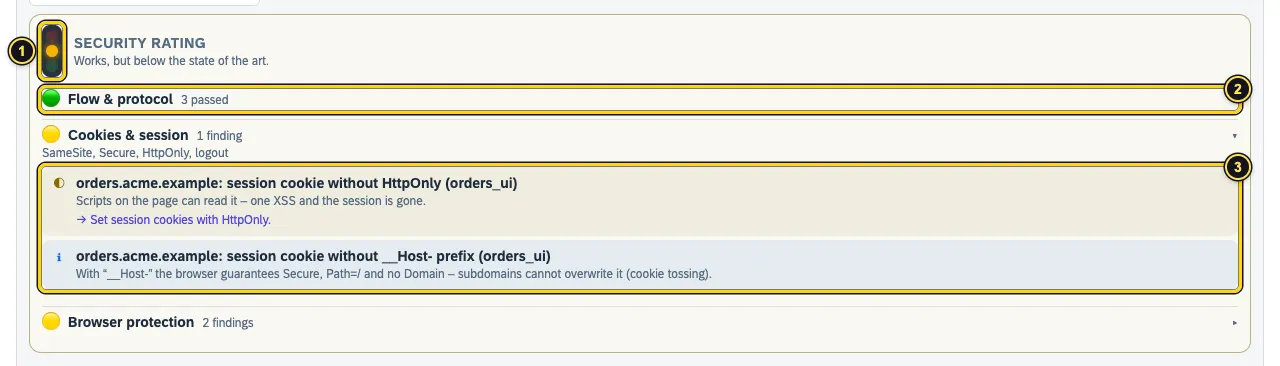
- The overall light – as red as the worst area.
- A green area with the number of passed checks.
- An opened area with its findings, each with consequence and fix.
| Area | What is checked |
|---|---|
| Flow & protocol | state, PKCE, nonce, grant, bindings across the flow |
| Tokens & signatures | algorithms, keys, certificates, lifetimes, attack patterns |
| Transport & leaks | HTTPS, tokens in URLs, Referer, cache, secrets in the browser |
| Cookies & session | SameSite, Secure, HttpOnly, logout |
| Browser protection | HSTS, framing, CSP, scripts, CORS and authenticity of the login pages |
Red means a critical or high finding, yellow a medium one. Plain notes (i) keep the light green. Purely functional findings such as a wrong audience or an expired token show up in the verdict, but do not count towards the security rating.
The login flow
For a recording or a HAR, AuthTailor draws the Login flow as a diagram with three lanes: browser, app and identity provider. Requests that are not part of the login are hidden.
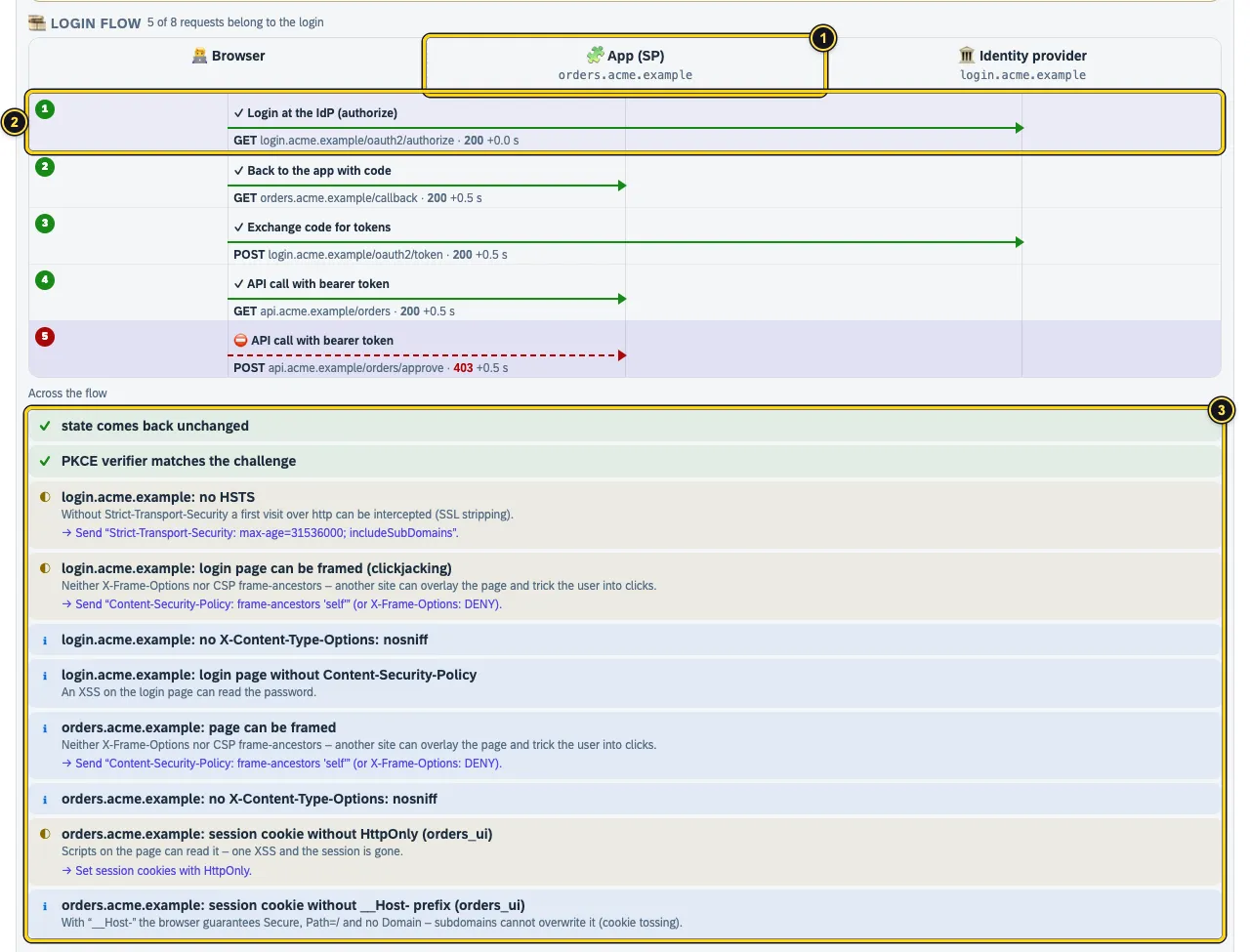
- The lanes with their hosts – here
orders.acme.exampleas the app andlogin.acme.exampleas the identity provider. - A step with title, method, URL, status and time since the first step. The red dashed arrow is the step where it breaks. A click opens the step’s details.
- Across the flow: checks that concern several steps together – does
statecome back unchanged, does the PKCE verifier match the challenge, are protective headers missing?
Headers of a step
If the Headers option was on during recording, each step shows its request and response headers. Values of cookies, Authorization and other secrets are masked.
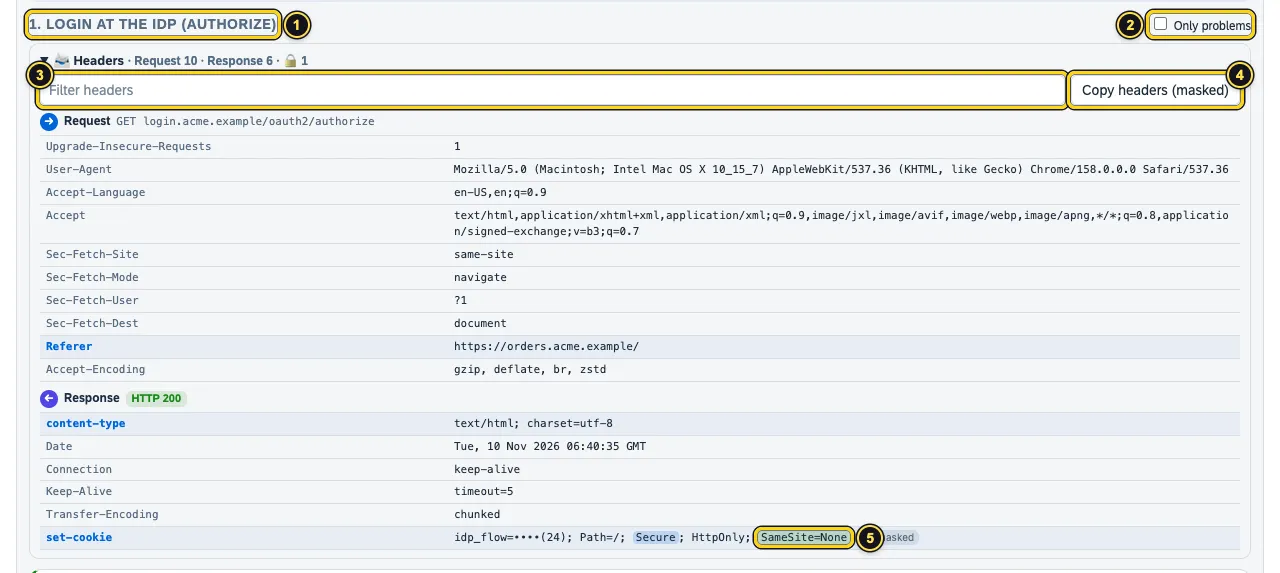
- The selected step.
- Only problems hides the passed checks in the cards below.
- Filter headers searches names and values.
- Copy headers (masked) puts the headers on the clipboard, without the secrets.
- Notable cookie attributes are highlighted – here
SameSite=None.
Cards and report
Below the flow there is one card per recognised message: token, SAML message, login URL, token response. What the cards contain is described in Tokens and SAML.
- Copy report puts a Markdown report on the clipboard – verdict, flow, findings and fixes, masked. It fits into a ticket or a chat.
- Save cleaned HAR saves a recording or a HAR without secrets: headers, cookies, parameters and bodies masked, JWTs without signature.
- Expected values can be filled after a recording with Take from the recording, see Paste and examples.
See also
- Features at a glance Features · Auth Trace
- Docs Tokens and SAML
- Docs Learning
- Docs Troubleshooting
- Sources Security rating1 · Headers2 · Report3