Getting started
From installation to the first finding in a few minutes: install the extension, open the panel with its icon, click an example – then record or paste your own login. No account and no server.
- Browsers
- Chrome, Edge, Firefox 115 or later
- Price
- free
- Account
- none needed
- Languages
- English and German
Install
AuthTailor is free in the Chrome Web Store. Edge installs the extension from the same listing; for Firefox there is a package on request.
Chrome
- Open the listing in the Chrome Web Store.
- Click Add to Chrome and confirm. Chrome lists only the fixed permissions; access to websites is optional and requested only when you record.
- Pin AuthTailor via the puzzle icon in the toolbar. Then the key icon is always visible.
Microsoft Edge
- Open the listing in the Chrome Web Store in Edge.
- In the notification bar, switch on Allow extensions from other stores.
- Add the extension with the button in the listing and confirm.
Firefox
For Firefox 115 or later there is a package on request via the contact form. In Firefox, AuthTailor appears as a sidebar instead of a side panel; everything else is the same.
Open the panel
A click on the key icon opens the panel. In Chrome and Edge it sits as a side panel next to the page and stays open while you click in the tab beside it. In Firefox the icon switches the sidebar on and off.

- The language switch EN · DE. On first start the panel follows the browser’s language; it remembers your choice.
- The tabs. A running recording keeps running when you switch tabs. The panel does not remember the selected tab.
Light or dark follows the operating system. At the bottom the panel shows the version and the note “Runs locally · no account · none of your data sent”.
First result with an example
Below the paste field there are five examples with made-up data (example.com). Times in them are relative to now, so expiry times look real.
- Open the Auth Trace tab.
- Under Try an example, click a tile, for example SAML Response.
- The example lands in the field and is checked straight away. Clear empties the field again.
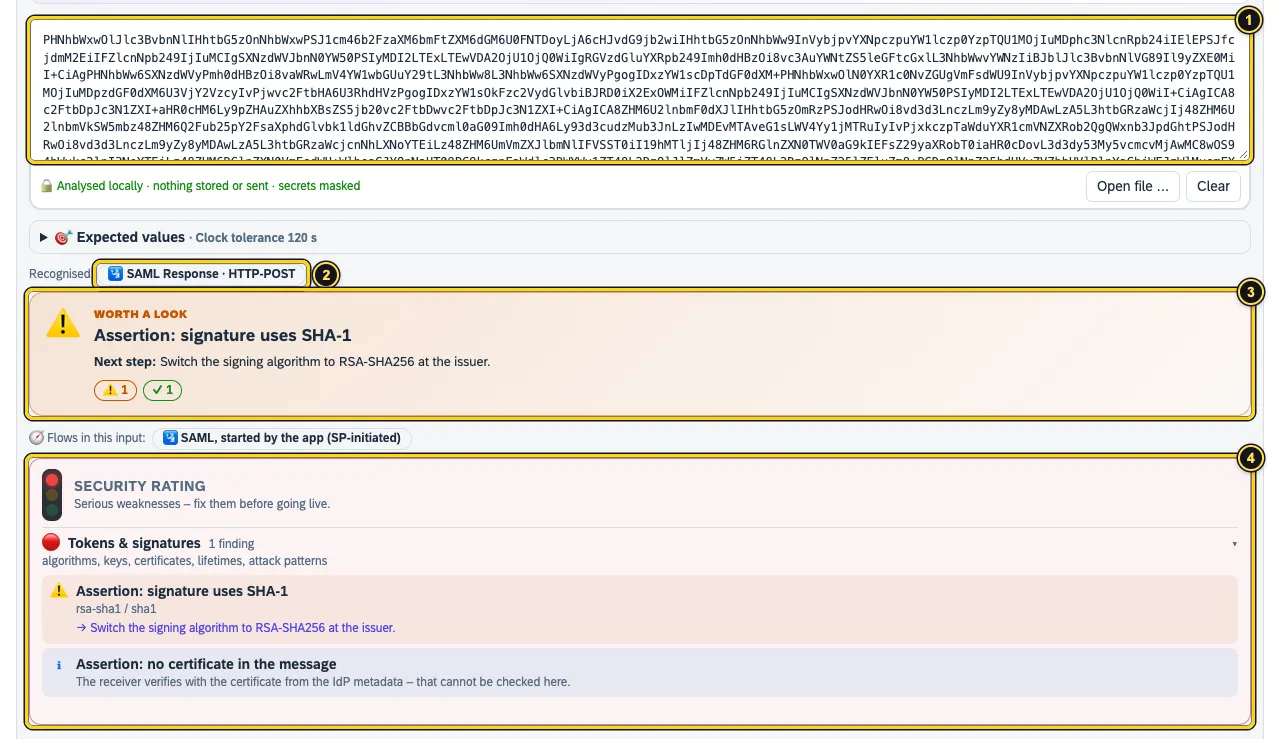
- The example is in the field.
- Recognised: what AuthTailor found in the input.
- The verdict with the next step – more in Reading the result.
- The security rating – the message’s card follows below, more in Tokens and SAML.
Record your first own login
- In Auth Trace, click Record live.
- The first time, the browser asks for access to all https sites. Allow it – without this access the browser cannot record.
- Log in in the tab next to it, as you normally would.
- Back in the panel, click Stop. The result appears below.
The access is only for the recording: AuthTailor requests it when you start and gives it back when you stop. Only SAML, OAuth and OIDC requests are recorded, no response bodies. More in Live capture and Permissions and privacy.
Or paste
If you already have a SAML Response, a JWT, a HAR file from the DevTools or an error message, paste it into the field Paste or drop here, drag the file onto it or choose Open file …. What AuthTailor recognises is listed in Paste and examples.
See also
- Security Security and permissions
- Docs Live capture
- Docs Paste and examples
- Docs Permissions and privacy
- Sources Chrome Web Store1 · Chrome, Edge, Firefox2 · Tabs3